

















Elevate Your Interiors
with Trendy Tiles Display
Tiles That Speak the Language of Design.
19th Jul, 2025
_(25).jpg)
If you’ve ever wished you could see how a tile would look on your kitchen wall before buying it, you’re not alone. That’s exactly what a kitchen wall tile visualizer app helps you do. These apps are digital tools that allow users to preview different tile designs on their kitchen walls using either preset kitchen layouts or by uploading a photo of their own kitchen.
Most visualizer apps work through simple user interfaces that let you select tile patterns, textures, and colors and apply them instantly to the wall area. Whether you’re renovating or designing from scratch, this tool bridges the gap between imagination and reality.
Why go through the trouble of guessing what your wall tiles will look like when you can visualize it with a tap?
Here are the key benefits:
Instant Design Previews: See how various tiles look on your kitchen wall in real-time.
Reduced Mistakes: Eliminate guesswork and avoid purchasing tiles that don’t match your design.
Cost Savings: Make smarter purchasing decisions by selecting the right tile the first time.
DIY-Friendly: You don’t need to hire a designer—these apps are intuitive and beginner-friendly.
With just a smartphone or computer, homeowners and interior designers alike can simulate how different combinations of tiles will appear under real lighting and with actual cabinet and countertop color schemes.
When selecting a kitchen wall tile visualizer app, not all tools are created equal. The most effective apps include features that not only make the design process intuitive but also mirror real-world results with a high degree of accuracy. Whether you're a homeowner designing your own space or a professional planner, certain capabilities are essential for a seamless and realistic experience.
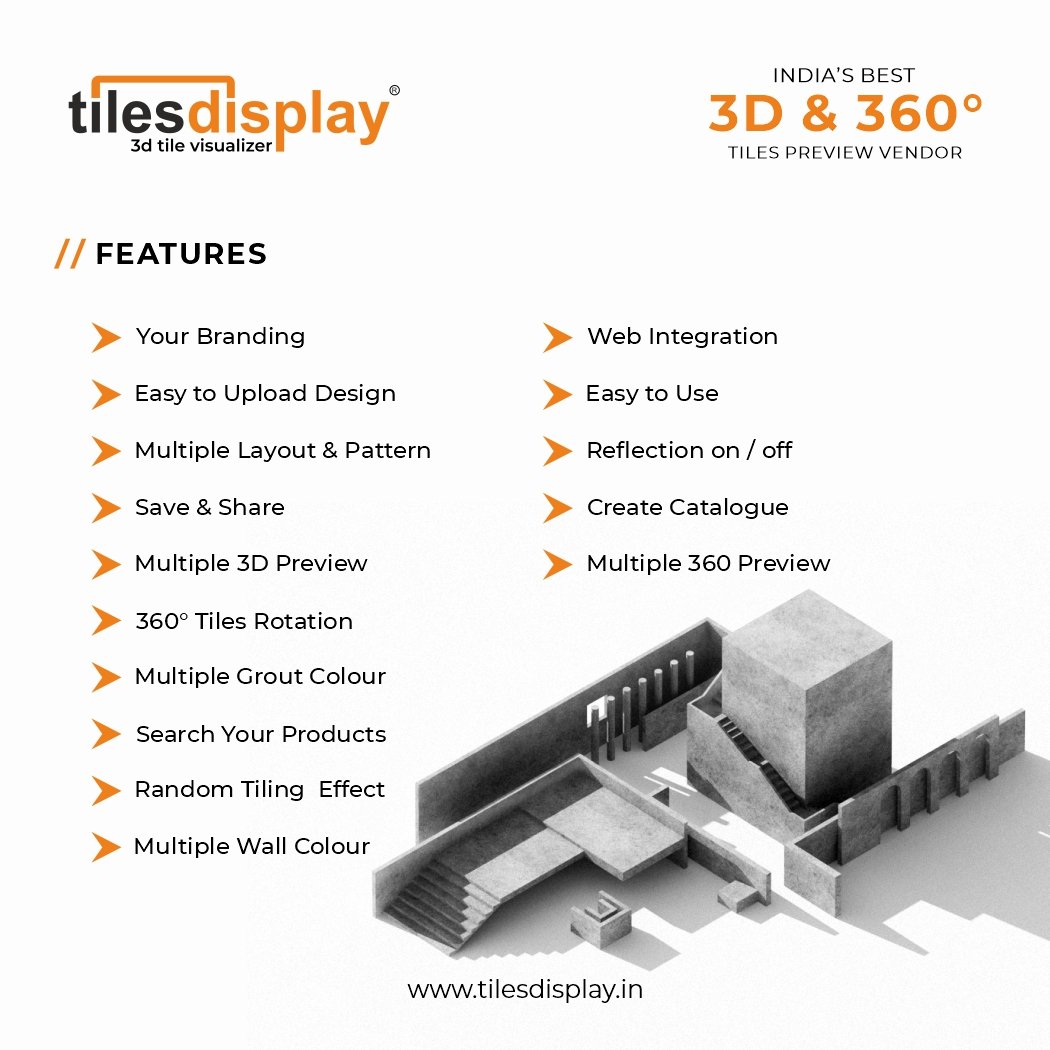
Below are the top features to look for:
This is arguably the most important feature. Apps that allow you to upload a photo of your actual kitchen enable you to visualize changes in your unique space rather than using generic templates.
Look for apps that auto-detect walls or let you manually mark tileable zones.
Better apps offer perspective correction so tiles scale properly on angled surfaces.
This feature turns a static photo into an interactive design canvas.
The rendering engine is the core of any visualizer. Top apps provide instant, real-time feedback as you change tile types, colors, grout lines, or layout patterns.
Drag-and-drop tiles onto your wall and see updates instantly.
Real-time previews help make faster design decisions without lag or processing delays.
Ideal tools offer responsive interactivity even on mobile devices.
Designing a kitchen is rarely a one-session activity. Look for visualizers that allow you to:
Save projects to the cloud or your device.
Download high-res previews for review.
Share your design with a contractor, friend, or family member directly from the app.
This is especially valuable when planning collaboratively or getting feedback from others.
Top-tier visualizer tools support 3D kitchen previews, helping you visualize depth, angles, and lighting more realistically than flat 2D designs.
See how light reflects off glossy tiles or how grout shadows affect the visual flow.
Rotate camera angles to inspect the tile layout from multiple perspectives.
Some tools also simulate cabinet and countertop alignment to ensure tile harmony.
An expansive and filterable tile library is crucial for practical use. The best apps offer:
Thousands of tile textures, sizes, and finishes from real tile brands.
Advanced filters (by color, pattern, material, or manufacturer).
Smart matching features to help coordinate tiles with countertops and floor tiles.
Some even allow you to match tile finishes with flooring options to create a cohesive look across the kitchen.
When it comes to free, powerful, and easy-to-use tools for visualizing wall tiles in your kitchen, Tilesdisplay stands out as one of the most specialized platforms available online. This kitchen-focused tile visualizer tool is designed specifically to help homeowners, designers, and renovators simulate tile installations on their actual kitchen walls with incredible precision.
Tilesdisplay is a web-based kitchen wall tile visualizer app that lets you upload a photo of your kitchen and instantly preview how various wall tiles will look. It’s built with usability in mind and requires no software installation—making it one of the most accessible design tools in its category.
It allows you to:
Match wall tiles to real kitchen environments
Preview tiles by material, pattern, or finish
Adjust layouts interactively for maximum accuracy
Whether you're remodeling or just exploring, Tilesdisplay removes guesswork from the tile selection process.
Tilesdisplay’s core feature is the ability to upload your actual kitchen photo. This transforms the experience from abstract to personalized:
Select the tileable area manually using the on-screen marker
Place wall tiles directly on the image
Adjust layout or orientation to fit walls, backsplashes, or vertical spaces
.jpg)
Tilesdisplay offers a curated collection of wall tiles organized by:
Material (ceramic, porcelain, marble, etc.)
Finish (matte, glossy, textured)
Style (modern, classic, mosaic)
Users can switch between tiles effortlessly and view the impact on their wall design instantly.
One of the most attractive aspects of Tilesdisplay is its zero-cost access. No downloads. No installation. Just open the website, upload your photo, and start designing.
Works on both desktop and mobile browsers
No account required for basic use
Real-time visualization with smooth interface
Tilesdisplay includes intelligent visualization algorithms that simulate tile textures and lighting in a realistic way. You can:
Match tiles by photo
Adjust grout width and orientation
Preview before/after side-by-side
If you’re looking for a dedicated wall tile visualizer app that offers premium-level features at zero cost, Tilesdisplay is an ideal choice. Its intuitive user interface, personalized photo upload system, and realistic tile rendering make it a go-to tool for both inspiration and serious design decisions.
Whether you're a homeowner planning a DIY remodel or an interior design professional presenting layout options to clients, Tilesdisplay delivers on all the essential fronts:
You can upload a real photo of your kitchen, allowing for accurate and context-specific tile placement.
It lets you simulate both backsplash and full wall tile layouts, giving a clear view of how your design will look in real life.
The platform allows users to explore tiles by material, finish, and pattern, making it easier to find a match that fits your design vision.
Tilesdisplay is 100% web-based, meaning there’s no need to download or install any software—just open your browser and start designing.
Best of all, the tool is completely free to use, giving you access to high-quality features without a paywall.
For anyone serious about previewing and perfecting their kitchen tile layout, Tilesdisplay provides a fast, flexible, and accessible solution.
Tilesdisplay is a standout example of how free visualizer apps can deliver pro-grade results without complexity. By letting you upload real kitchen images and match wall tiles by photo, it empowers you to take control of your kitchen’s look before lifting a single tile.
For anyone searching for a free kitchen tile layout tool that’s practical, precise, and built for real-world kitchens Tilesdisplay is the tool to try.
Using a kitchen countertop or wall tile visualizer with a photo upload feature is one of the most effective ways to simulate changes in your own space. Here's how:
Take a Photo: Capture a high-resolution image of your kitchen, focusing on the wall or backsplash.
Upload It: Use the upload tool inside the app to insert your photo.
Outline the Wall Area: Most apps allow you to mark the wall or tile area.
Choose Tiles: Select from the available library to test colors, shapes, and layouts.
Preview & Save: View your design, compare options, and save your favorite looks.
This method offers a customized experience and ensures what you see is what you’ll get.
There are many types of visualizer platforms, but they typically fall into two categories: web-based apps and desktop software. Here's how they compare:
|
Feature |
Web App |
Desktop Software |
|
Accessibility |
Use on any browser |
Requires installation |
|
Cost |
Usually free or freemium |
May be premium-priced |
|
Features |
Basic to moderate |
Advanced design features |
|
Best For |
DIY homeowners |
Professional designers |
If you're looking for a quick preview or inspiration, a free online visualizer is usually sufficient. If you’re remodeling an entire kitchen or working with contractors, software like SketchUp or Chief Architect may offer more precision.
Choosing the right tile layout can completely transform the look and feel of your kitchen. A kitchen wall tile visualizer app is the perfect tool to experiment with layout patterns before committing to any specific style. Whether you're updating a small backsplash or designing an entire kitchen wall, visualizers let you explore, test, and tweak different arrangements to suit your space and taste.
Below are some creative layout ideas that work especially well in visualizer apps like Tilesdisplay.

Subway tiles are timeless and versatile. Typically arranged in a horizontal brick pattern, they bring a clean, classic aesthetic to kitchens. In visualizers, you can try variations like:
Traditional staggered offset
Vertical stack for a modern twist
Diagonal subway layout for added energy
Subway tiles work well with both light and dark grout, which you can adjust in the app to see contrast levels and surface texture.
Mosaic tiles are perfect for adding artistic detail and texture. Whether made from glass, ceramic, or stone, they’re usually applied in sheet form with intricate patterns or color blends.
With a tile visualizer, you can:
Explore multicolor mixes to match cabinets or countertops
Simulate small-scale patterns like hexagons or pebbles
Experiment with glossy finishes and metallic accents
These are great for backsplashes behind sinks or cooktops, where you want a focal point.
For a more dynamic and high-impact aesthetic, herringbone and chevron layouts offer a bold visual statement.
Herringbone uses rectangular tiles placed at 45-degree angles, forming a zigzag pattern
Chevron tiles are cut on an angle, creating a continuous “V” shape that feels clean and modern
In a visualizer, these patterns can be rotated, resized, and recolored to fit your wall’s dimensions and the tone of the overall design.
Want something more unique? Many visualizer apps support geometric tiles, such as:
Hexagons
Diamond tiles
Arabesque or Moroccan patterns
Mixed-format layouts (e.g., combining large and small tiles)
With tools like Tilesdisplay, you can preview how these non-standard shapes affect the perception of wall height, symmetry, and kitchen lighting.
Sometimes, a tile layout isn't meant for the whole kitchen—just a specific feature area. Visualizers help you simulate partial wall layouts such as:
A single statement strip of tiles
A full backsplash panel behind the stove
A tile border framing open shelving or cabinetry
These ideas work best when tested visually, as balance and proportion are critical. Tilesdisplay lets you map out exact boundaries before you tile.
Use the zoom-in feature to check tile spacing and grout width
Switch between tile materials to see how finish affects pattern visibility
Preview with lighting simulation, if available, to check shadows and reflections
Take screenshots of each layout to compare options side by side
With a kitchen tile layout visualizer, you’re not limited to guessing how a pattern might look—you can actually see the impact of layout, color, and symmetry in real-time. Whether you love classic subway, intricate mosaics, or bold geometric patterns, a tool like Tilesdisplay gives you the freedom to visualize, experiment, and refine your design ideas before committing to a single tile.
With a wide range of kitchen wall tile visualizer tools available—from free web apps to professional-grade design software—selecting the right one can feel overwhelming. The best visualizer isn’t just the one with the most features; it’s the one that aligns with your design goals, device compatibility, and technical comfort level.
Here’s a decision-making guide to help you choose the ideal visualizer for your kitchen renovation or design project.
Start by assessing how easy the tool is to use. A well-designed tile visualizer should offer:
An intuitive interface with clear icons and drag-and-drop functionality
Smooth navigation between features like layout, tile selection, and color palettes
Responsive performance with minimal loading time
If you find yourself confused by menus or struggling to figure out how to upload a photo, that’s a red flag.
A visualizer tool is only as useful as its tile selection. The best apps provide:
A diverse tile catalog that includes real manufacturer products
Filters by color, material, finish, size, and price range
The ability to search or browse tiles that match your design vision
Pro tip: Choose tools that reflect actual product availability, especially if you're planning to purchase the tiles shown.
Some apps work only on desktops, while others are optimized for tablets or smartphones. Before committing to a visualizer tool:
Make sure it supports your preferred device (Windows, Mac, iOS, Android)
Check whether it requires installation or works via browser
Ensure image rendering is smooth and responsive on your system
Some tools may offer better performance on desktop, especially for larger screens or advanced editing.
For personalized design, it’s essential that the visualizer allows you to:
Upload a photo of your actual kitchen
Mark the tileable area manually or automatically
Adjust perspective, brightness, and scale for realism
Tools without this feature are generally limited to generic room templates, which may not reflect your real space accurately.
While core features matter most, bonus features can improve usability and project planning, such as:
Cloud saving and design export for later edits
Downloadable high-res images for presentations or contractor collaboration
Side-by-side comparison views to test different tile patterns
Grout adjustment settings for even finer control
Look for tools with a balance of essential functions and these smart extras.
Here’s a checklist of criteria to guide your final selection:
Is the app easy to use with clear controls?
Does it offer a broad and realistic tile library?
Can it run on your device without performance issues?
Does it allow photo uploads of your actual kitchen?
Are there extra features like saving, sharing, or exporting?
The “best” kitchen wall tile visualizer app is the one that helps you design with confidence, speed, and accuracy. Whether you’re seeking inspiration or making final decisions, prioritize tools that match your workflow, device, and level of expertise. For most users, simplicity and realism are key—especially when visualizing tiles in a real-life kitchen setting.
When in doubt, start with a free visualizer like Tilesdisplay, and then consider upgrading to more advanced tools as your design needs grow.
Using a kitchen wall tile visualizer app can completely transform how you approach home renovation. These tools eliminate the guesswork in tile selection, help you stay on budget, and make it much easier to communicate your design ideas with professionals.
Whether you're a first-time DIYer or collaborating with a contractor, visualizer tools empower you to:
Explore styles safely before purchasing
Upload real kitchen photos for personalized previews
Compare different tile materials, patterns, and colors
Make confident, informed decisions
From free online visualizers to more advanced kitchen planning software, there’s an option that suits every project and budget. Try one today and bring your dream kitchen to life—virtually.
Yes. Many top apps offer free versions with essential features like photo upload and tile selection. Some premium features (e.g., export, high-res rendering) may require a paid upgrade.
Absolutely. One of the most useful features is the ability to upload a photo of your actual kitchen. This helps you visualize how the tiles will look in your space with your lighting and layout.
Most modern kitchen tile visualizer apps are mobile-friendly and available for download on both Android and iOS. Some web-based versions are responsive and work well in mobile browsers too.
Yes, especially when using apps from retailers like Home Depot, Lowe’s, or Tilelook. These apps often showcase real, purchasable tiles from verified brands.
Definitely. Many visualizer tools let you preview backsplashes, countertops, cabinets, and flooring. Some even allow full kitchen planning for a holistic design experience.
